ALAND's Immersive Hypixel SkyBlock modpack page
- Downloads
- 31.8K
- Mod loaders
- fabric
- Minecraft versions
- 26.1.2, 1.21.11, 1.21.10, 1.21.5
- Categories
- adventure, multiplayer, optimization
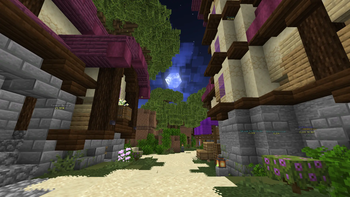
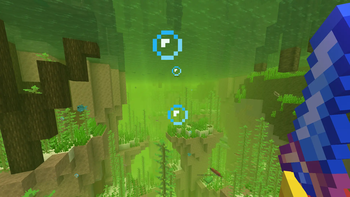
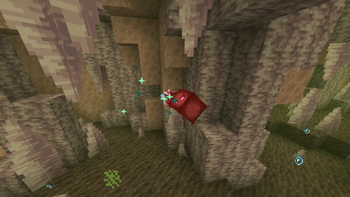
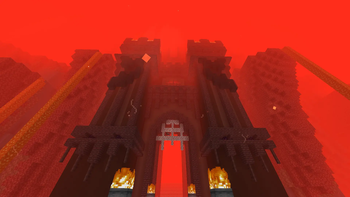
ALAND's Immersive Hypixel SkyBlock screenshots
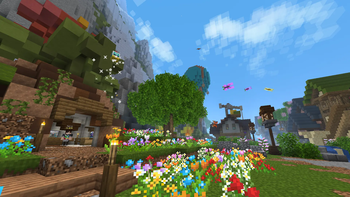
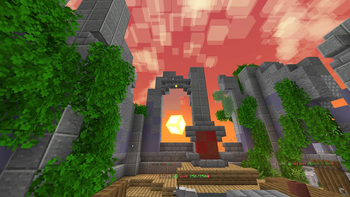
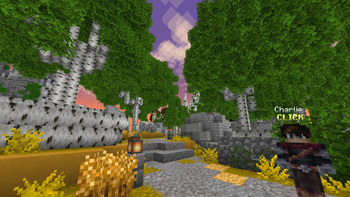
About this modpack
What sets this modpack apart from others:
- Includes all the essential optimization and QoL mods for Hypixel SkyBlock
- Includes a ton of immersive client-side mods that enhance visuals and gameplay
- Pre-configured mods with all the necessary features without having 20 obtrusive overlays
- Ready-to-go command macros/keybinds for essential warps and menus
- Fully open source with frequent updates for relevant versions
- Expressive animations that make the world come alive
- Optional resource packs that enhance the general experience
<iframe width="560" height="315" src="https://www.youtube-nocookie.com/embed/dFxnLV_oAAI" title="YouTube video player" frameborder="0" allow="accelerometer; autoplay; clipboard-write; encrypted-media; gyroscope; picture-in-picture; web-share" allowfullscreen></iframe> <iframe width="560" height="315" src="https://www.youtube-nocookie.com/embed/G15ZBBbhdqY" title="YouTube video player" frameborder="0" allow="accelerometer; autoplay; clipboard-write; encrypted-media; gyroscope; picture-in-picture; web-share" allowfullscreen></iframe> <iframe width="560" height="315" src="https://www.youtube-nocookie.com/embed/36jg0e-NCkQ" title="YouTube video player" frameborder="0" allow="accelerometer; autoplay; clipboard-write; encrypted-media; gyroscope; picture-in-picture; web-share" allowfullscreen></iframe>
<details> <summary>💻 Installation Guide & Tips</summary>
Installation Guide:
- Install Prism Launcher (HIGHLY RECOMMENDED, It's faster, better, and has a ton of QoL features)
- In Prism Launcher, click Add Instance ➞ Modrinth ➞ Type "ALAND" in the Search ➞ Click the Modpack ➞ Click OK
- TIP 1: For Prism users, make sure you select the correct Java version and dedicate at least 4GB of RAM.
- TIP 2: Type /skyocean keybinds to open the command macros/keybinds. These run commands for Hypixel SkyBlock such as warps and menus for quick access and you can edit them if you want.
- TIP 3: Tap Right Ctrl to open the weather and time control menu.
- TIP 4: Don't like a certain mod/feature/resource pack? Just delete/configure it however you like!
</details>
<details> <summary>⚙️ Mods & Features</summary>
🌎 Hypixel SkyBlock Mods:
- Custom Scoreboard: Adds a customizable scoreboard that resembles SkyHanni's, but with more features
- Modern Warp Menu: Adds a custom warp menu that shows all SkyBlock islands
- Odin: Adds Dungeon & Kuudra QoL and solvers, secret routes, and more
- Skyblock Overhaul (SBO): Adds Diana helpers and waypoints, plus a dedicated party finder
- SkyBlock Profile Viewer: Adds a /pv command to view player profiles like NEU
- Skyblocker: More QoL not in SkyHanni (Dungeons, Chat Filters, UI & Armor Customization, etc.)
- SkyHanni: Broad list of QoL features (Garden, Chocolate Factory, Slayer, etc.)
- SkyOcean: Compact QoL mod (Craft Helper, Item Search Screen, Custom Chest & Vanguard opening, etc.)
⚡️ Performance Mods:
- Async
- AsyncParticles
- BadOptimizations
- Dynamic FPS
- Entity Culling
- FerriteCore
- ImmediatelyFast
- Krypton
- Lithium
- More Culling
- Nvidium
- ScalableLux
- Sodium
- Stfu
- Very Many Players (Fabric)
✨ Immersive Mods:
- 3D Skin Layers: Makes the outer layer of skins 3D
- AmbientSounds: Adds relaxing ambient sounds
- Animated Typing: Adds a subtle animation when typing text in the chat
- Better Clouds: Adds fancy animated clouds with varied size and height
- [Chat Animation [Smooth Chat]](https://modrinth.com/mod/chatanimation): Adds a subtle animation to chat messages when they appear
- Continuity: Allows for efficient connected textures
- Cool Rain: Adds different rain sounds based on block type
- [[EMF] Entity Model Features](https://modrinth.com/mod/entity-model-features): Adds resource pack support for custom entity models
- [[ESF] Entity Sound Features](https://modrinth.com/mod/esf): Adds custom sounds to certain mob variants, like endermen for example
- [[ETF] Entity Texture Features](https://modrinth.com/mod/entitytexturefeatures): Adds resource pack support for custom entity textures
- Fancy Door Animations: Adds an animation to opening doors, trapdoors, and gates
- Immersive Hotbar: Makes your hotbar animated and reactive
- Immersive UI: Adds sparkly particles and held item physics when moving around with your mouse
- Inventory Particles: Adds interactive particles to items in your inventory
- Particle Rain: Revamps rain and adds fog and other effects
- Particular Reforged: Adds water splashes and other particles and sounds
- Polytone: Adds tons of customization features for resource packs to use
- Sodium Core Shader Support: Adds support for resource packs to use Core Shaders and Sodium together
- Sounds: Adds new sounds to items, blocks, UI, and more
- Subtle Effects: Adds many new subtle details through particles and sounds
- Swinging Lanterns: Makes lanterns swing and sway in the wind
- Visuality: Adds new particles to mobs
- Wavey Capes: Makes your cape animated with physics
- Windy: Adds subtle wind particles
❤️ QoL Mods:
- Am I Up To Date?: Notifies you when a new modpack update is available
- Better F1 Reborn: Adds an intermediate F1 state that turns off only the HUD
- BetterF3: Makes the F3 menu more readable and customizable
- Capes: Lets you use capes from OptiFine, LabyMod and other cape mods
- Chat Patches: QoL changes and improvements to chat
- Client Time: Allows controlling time, weather, and moon phases client-side
- Cubes Without Borders: Allows you to play Minecraft in a borderless fullscreen window
- Cursors Extended: Changes the mouse cursor to be more fancy and adaptive
- Gamma Utils (Fullbright): Allows toggling fullbright on or off
- Mod Menu: Adds a mod menu to view and config your mods
- Nametag Tweaks: Makes your nametag viewable in third person and more
- Not Enough Crashes: Takes you back to the title screen when you crash
- Packed Packs: Allows drag and dropping and selecting multiple packs in the resource packs menu
- Quick Connect Button: Adds a button to quickly join Hypixel from the title screen
- Reese's Sodium Options: Alternative Options Menu for Sodium with QoL improvements
- Roughly Enough Items (REI): Adds an item list to SkyBlock with search functionality
- REI Search Bar Calculations: Adds a calculator to REI's search bar
- Respackopts: Adds a config menu to some resource packs
- Screencopy: Automatically copies screenshots to clipboard
- Simple Menu: Adds custom icons and a Join Discord button plus more to the title screen
- Smooth Scrolling: Smoothly scrolls chat, hotbar, creative inventory and more
- Sodium Extra: Adds most of OptiFine's eye-candy options to Sodium
- Sound Controller: Allows controlling the volume of individual sounds
- Tooltip Scroll: Allows you to move/scroll tooltips
- Zoomify: A zoom mod with infinite customizability
📒 Library Mods (Dependencies):
- Architectury API
- Cloth Config API
- Collective
- CreativeCore
- Fabric API
- Fabric Language Kotlin
- Forge Config API Port
- Fzzy Config
- LibJF
- MidnightLib
- MossyLib
- M.R.U
- OctoLib
- Player Animation Library
- Text Placeholder API
- YetAnotherConfigLib (YACL)
</details>
<details> <summary>🖼️ Resource Packs</summary>
- AL's Boss Rush x Fresh Animations: Retextures bosses with FA support
- AL's Enderman Revamped x Fresh Animations: Adds new enderman variants with FA support
- AL's Piglins Revamped x Fresh Animations: Adds new piglin variants with FA support
- AL's Skeletons Revamped x Fresh Animations: Adds new skeleton variants with FA support
- AL's Spiders Revamped x Fresh Animations: Adds new spider variants with FA support
- AL's Zombies Revamped x Fresh Animations: Adds new zombie variants with FA support
- ALAND's Hypixel SkyBlock Enchanted Books: Gives Hypixel SkyBlock's enchanted books unique textures
- Animated Items (Etomic): Gives vanilla items fancy animations
- Animated Items (palettemc): Gives more vanilla items fancy animations
- Animated+: Gives light blocks fancy animations
- Arkudii's Detailed Hypixel Skyblock: Adds Dark Mode and lots of custom blocks all over SkyBlock
- Cookie Clicker Click Sound: Replaces the menu clicking sound with the one from Cookie Clicker
- Creepers Reforged x FA: Adds variants to Creepers, including a baby one with FA support
- Drodi's Blazes x Fresh Animations: Retextures the blaze and adds a boss variant with FA support
- Dungeon Tooltips: Makes item tooltips much better
- Fresh Animations: Gives mobs better animations
- Fresh Animations - Ghasts Galore: Adds new ghast and squid variants with FA support
- FurSky Reborn: Retextures SkyBlock items in an artistic and themed style
- Golems Refreshed + Fresh Animations: Adds new golem variants with FA support
- Light Leak: Adds light rays and glow effects to light blocks
- NEVEREND | Reimagined Ender Dragon: Adds a new Ender Dragon model and some more end features
- ReShaded: Adds shader-like visuals with no FPS loss
- Saturated Grass!: Makes grass slightly more saturated
- Shaded Font: Adds a subtle shading effect to the default font
- Simple Grass Flowers: Adds flowers to different types of grass
- SkyBlock Dark UI: Makes every menu dark so you don't get flashbanged
- Stay True: Retextures the whole game in a faithful vanilla+ style
- Vanilla Tweaks: Adds a 3D sun & moon, twinkling stars, menu slot highlight, and more
- Visual Effects+: Adds tons of fancy visual effects, particles, and ambience to your world
- Vocal Villagers: Tweaks villager sounds and adds more variants
</details>
<details> <summary>❓ FAQ</summary>
Why did the modpack crash/fail to load?
- Make sure you select the correct Java version and dedicate at least 4GB of RAM. Guide
Why is my FPS stuck at 60?
- VSync is turned on to prevent screen tear artefacts and reduce resource usage, ensuring a smooth experience. You can disable it in the general Video Settings and by configuring the Dynamic FPS mod to turn it off everywhere.
I'm having FPS issues! How to fix?
- If you play on a potato, try disabling some/all resource packs and further lowering your graphical settings. P.S. Lag during game startup is to be expected, just give it a minute or two to load everything.
How do I change time/weather?
- Tap the "Right Control" key.
I don't use Prism Launcher, how do I load the modpack?
- You can use some other launchers like the official Modrinth launcher, NoRisk, and maybe more. However, I'd recommend you install Prism Launcher, it's lightweight, super fast, and allows you to download mods/resource packs with ease. It's the best option for modern Minecraft.
Can I transfer my own config files for x mod?
- Yes, you can just delete the config file of any mod in the modpack's "config" folder and replace it with your own. This way, you can transfer your own SkyHanni/Skyblocker/other settings over.
Why did I randomly warp/trigger a command by tapping a random key?
- These are known as command macros/keybinds. Type /skyocean keybinds to open the config menu. You can assign any key and make it run any command you want to make warping/accessing menus easier!
I have other questions/feedback/issues...
- Join the Discord and feel free to ping me so I can help!
</details>
<details> <summary>⭐️ Credits</summary>
- Huge thanks to ic22487 for creating the modpack icon! Get this man a Ko-fi on my behalf, would ya?
- Big thanks to TraitorAlmighty from the FurSky Reborn team for helping out with optimization and setup.
- Special thanks to jlhklmn for creating the new title logo!
- Shoutout to haimcyfly and Stay True for being awesome. Check out Stay True's CurseForge page here: https://www.curseforge.com/minecraft/texture-packs/stay-true
- All credit for the mods and resource packs goes to their original creators, I do not claim that I own any of their work. Be sure to check out and support their mods and other projects.
</details>
Modpack wiki coverage
Orca uses the project's published metadata and version files as the source of truth. Item, block, mob, recipe, structure, dimension, GUI, and mechanic pages are added after their included mod files are extracted and attributed.