Blue Lotus: Beyond modpack page
- Downloads
- 1.2K
- Mod loaders
- quilt
- Minecraft versions
- 1.20.1
- Categories
- adventure, magic, multiplayer
Blue Lotus: Beyond screenshots

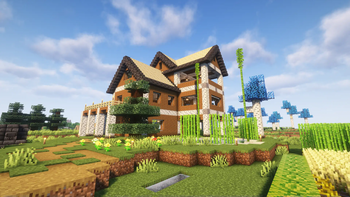
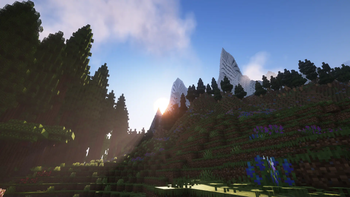
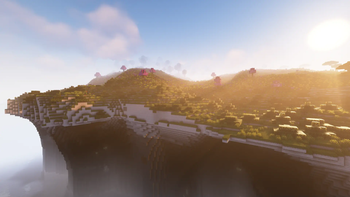
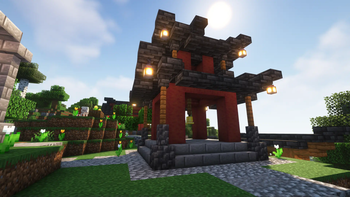

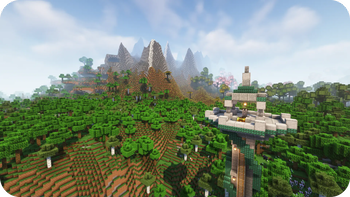
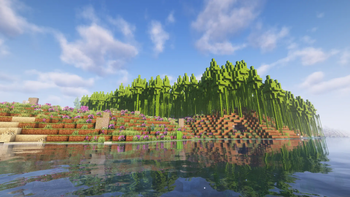
About this modpack
<br> <br>
<center> <img src="https://raw.githubusercontent.com/tazta2ra/bluelotus-beyond/main/assets/logo/title_border.png" alt="Blue Lotus: Beyond" height="300"> <br> <h4>A massive vanilla+ modpack focused on exploration and adventure while enhancing vanilla gamplay with lots of Quality of Life improvements. </h4> </center>
<hr>
<center> <font size="10"> <b>Features</b> </font> </center> <br> <br>
<p>Blue Lotus brings many improvements to Minecraft's boring world.</p>
<ul> <li><font size="4">🎭 Play your way!</font> </li> <ul>Start your game with different <b>Origins</b> or stick to the classic vanilla gameplay!</ul><br> <li><font size="4">🗺️ Improved world generation</font></li> <ul>Including better terrain with <b>Tectonic v2</b>, many new biomes added by <b>Regions Unexplored</b> & <b>Nullscape</b>, countless structure mods such as <b> Towns and Towers </b>, <b>Repurposed Structures</b> and <b>Yung's Better Structures</b>.</ul><br> <li><font size="4">🍃 Enhanced visuals and Immerison</font></li> <ul>Ambient Sounds, built in shader support with <b>Iris</b>, dynamic lighting, <b>FogLooksGoodNow</b> and some awsome particle improvements thanks to <b>Explosive Enhancement</b> and <b>Falling Leaves</b>.</ul><br> <li><font size="4">💎 New Materials</font></li> <ul>Many new, unique and interesting ores added by <b>Mythic Metals</b></ul><br> <li><font size="4">🏠 Builders Rejoice!</font></li> <ul>Infinite building possibilities and lots of new blocks thanks to <b>Stoneworks</b>!</ul><br> <li><font size="4">⚙️ Redstoner's paradise!</font></li> <ul>Accomplish your wildest redstone dreams with: <b>RedBits</b>, <b>Copper Hopper</b> and <b>Supplementaries</b></ul><br> <li><font size="4">🛒 Minecart improvements</font></li> <ul>Connectable carts with <b>Linkart</b> and <b>High-Speed Rail</b>, ice boats are no longer the fastest way to travel!</ul><br> <li><font size="4">🦴 Archeology on a new level!</font></li> <ul>Improvements thanks to <b>Better Archeology</b></ul><br> <li><font size="4">🤠 Express yourself!</font></li> <ul><b>Fabric Tailor</b>, <b>Ears</b>, <b>Bedspreads</b>, <b>More Armor Trims</b>, <b>Elytra Trims</b> and <b>Emoji Type</b> help you express yourself more than ever! </ul><br> <li><font size="4">📈 General QoL improvements</font></li> <ul>Supplementaries, Universal Enchants, Right Click Harvest, Reacharound, Leaves Be Gone, Better Statistics Screen...</ul><br> <li><font size="4">And many, many more...</font></li>
</ul> <img src="https://cdn.modrinth.com/data/ElPWwjX0/images/bb07a5983026c2dec754b3fe9ae8cc63c5ca6ffd.png" alt="Screenshot of a very cool modpack" width="1377" height="810">
<hr> <center> <font size="6"> <b>Multiplayer</b> </font> </center> <br> <br>
<center><b>Made for multiplayer!</b> <p>Together or alone, with friend or foes!</p> <p>Want to play on your server? Follow the installation instructions <a href="https://tazta2ra.github.io/beyond#download">here</a>!</p> </center> <ul> <li><font size="4">⏩ Optimized</font></li> <ul>Many optimization mods for a speedy performance</ul><br> <li><font size="4">🔊 Integrated Voice chat</font></li> <ul>Proximity voice chat has never been easier with <b>Simple Voice Chat</b>!</ul><br> <li><font size="4">🪙 No more loot hoarding!</font></li> <ul>Every player has their own loot in chests thanks to <b>Lootr</b>!</ul><br> <li><font size="4">💤 Sleepy time</font></li> <ul>Only half of the players need to sleep to pass the night (<a href="https://modrinth.com/datapack/serversleep">Server Sleep</a>)</ul><br> <li><font size="4">👕 Brand new look!</font></li> <ul>Server side skin system, custom capes and more! (<a href="https://modrinth.com/mod/fabrictailor">Fabric Tailor</a>)</ul><br> <li><font size="4">🎈 Party time!</font></li> <ul>Create parties and claim your chunks</ul><br>
</ul> <center> <img src="https://i.imgur.com/trWrjZB.png" alt="Inventory"> <br> <br> <b>Inventory</b> </center> <br> <hr> <center> <b> <font size="6" id="download">How to install?</font> </b> </center> <h3>For players:</h3> <p>Download the <a href="https://modrinth.com/app">Modrinth App</a> or a launcher that supports modrinth (e.g. <a href="https://prismlauncher.org/">Prism Launcher</a>) then follow the <a href="https://docs.modrinth.com/docs/modpacks/playing_modpacks/#multimc-and-prism-launcher">installation instructions</a> for the launcher of your choice.</p> <a href="https://modrinth.com/modpack/bluelotus-beyond">Modpack page on Modrinth</a> <h3>For Servers:</h3> <ul> <li>Download the latest version of <a href="https://github.com/nothub/mrpack-install/releases">mrpack-install</a></li> <li>Open the command line, navigate to the directory</li> <li>Run <code>mrpack-install bluelotus-beyond 0.6.0</code></li> <li>Wait for the download to finish</li> <li>Navigate into the new "mc" folder</li> <li>Now run <code>java -Xmx3G -Xms1G -jar quilt-server-launch.jar</code></li> <ul style="color: gray ;">Set <code>-Xmx</code> to the amount of RAM you want your server to use. (at least 2.5GB)</ul> <li>You're Done!</li> </ul> <br>
<hr> <center> <font size="6" id="faq"> <b>Frequently Asked Questions</b></font> </center> <p></p> <details> <summary>📄 TODO list:</summary> <p>These are my future plans for the pack, not a 100% guarantee</p> <ul> <li>✔️ Writing out full modlist</li> <li>❓ Marking client side only mods</li> <li>Missing Mods:</li> <ul> <li>❓ Additional Lanterns Connectible chains Compat (Not yet released)</li> <li>☑️ Another Furniture</li> <li>☑️ Effective </li> <li>☑️ YUNG's API</li> <li>☑️ YUNG's Better Dungeons</li> <li>☑️ YUNG's Better Nether Fortresses</li> <li>☑️ YUNG's Better Jungle Temples</li> <li>☑️ YUNG's Better Strongholds</li> <li>☑️ YUNG's Better Desert Pyramids</li> <li>☑️ YUNG's Better Ocean Monuments</li> <li>☑️ YUNG's Better Mineshafts</li> <li>☑️ YUNG's Better End Island</li> <li>☑️ YUNG's Better Witch Huts</li> </ul> </ul> </details>
<details open=""> <summary>❓ FAQ</summary> <h3>🔄 Verisoning :</h3> <p>The modpack uses a new version system: <b>Major.Minor.Patch</b></p> <ul> <li>Major : A new version of minecraft or a big modpack change, <b>these updates are not backwards compatible.</b></li> <li>Minor : New mods might have been added or removed, <b>read the changelogs to see if it's backwards compatible.</b></li> <li>Patch : Updated mods, safe to update worlds.</li> </ul> <h3>💻 System requirements:</h3> <p>With these specs I was able to achive an average of <b>60 fps</b>.</p> <center> <div style="overflow-x:auto;"> <table> <tr> <td>💻</td> <td><b><center>Minimum</center></b></td> <td><b><center>Reccommended</center></b></td> </tr> <tr> <td><b><center>RAM</center></b></td> <td>2.5GB</td> <td>4GB+</td> </tr> </table></div></center> <h3>🟪 Why Quilt? :</h3> <p>They have a better website.</p> <h3>📊 Differences between BL:Classic and BL:Beyond :</h3> <p>Beyond has more mods and features. It is considered the succesor of classic. Main reason why this pack exists is Tectonic v2, when i started making the pack it was only availible on 1.20. I also needed a fresh start for my modpack, classic has way too many versions and changed way too much.</p> <a href="https://modrinth.com/modpack/bluelotus"> Click here if you want to try Blue Lotus: Classic </a> </details> <br> <hr> <center><font size="6"><b>Credits</b></font></center> <p></p> <details>
<summary>🧩 Included Mods:</summary> <h3>Mods from CurseForge :</h3> <ul> <li><a href="https://www.curseforge.com/projects/560091">Towers of the Wild: Additions</a></li> </ul> <h3>Mods from Modrinth :</h3>
- Ambient Environment
- Friends&Foes - Flowery Mooblooms
- Simple Voice Chat Enhanced Groups
- NPC Variety
- Cloth Config v11
- DCCH
- AmbientSounds
- Simple RPC
- Bigger Better End Cities
- Pumpkin Pie Delight
- Maycarios's Higher Build Limit
- Universal Shops
- Splashy
- SuperMartijn642's Core Lib
- YUNG's Better Desert Temples
- Sound Physics Remastered
- NetherPortalFix
- [Telepistons](none)
- DistractingTrims
- YUNG's Better Strongholds
- AutoTag Convention
- Durability Tooltip
- Enhanced Block Entities
- Delete Worlds To Trash
- Variant Crafting Tables
- Simple Voice Chat
- Mythic Metals
- Tax Free Levels
- Cinderscapes
- Puzzles Lib
- XP Storage
- Sword Blocking Mechanics
- Head name fix
- Easy Anvils
- EMI
- Iceberg
- Lavender
- Nullscape
- Easy Shulker Boxes
- Raised
- Alternate Current
- Variant Bookshelves
- Cristel Lib
- Not Enough Recipe Book
- Logical Dye Mixing
- Armorful
- Origins Minus
- More Axolotl Variants API
- Fast Paintings
- Fabric Tailor
- Dynamic FPS
- Not Enough Crashes
- Scaffolding Drops Nearby
- Zoomify
- Players Drop Heads
- Presence Footsteps
- MmmMmmMmmMmm
- Ding
- Reacharound
- Universal Enchants
- YUNG's Better Ocean Monuments
- Formations Nether
- Async Locator
- HorseInBoat
- Easy Magic
- Dynamic Music
- Beacon Overhaul
- Illager Invasion
- Resource Pack Overrides
- Ping Wheel
- Iris
- Necronomicon
- ThreadTweak
- Trade Uses
- Moonlight
- Pehkui
- Cherished Worlds
- Head In The Clouds
- Packet Fixer
- Formations
- EMI Loot
- Universal Sawmill
- Macaw's Paintings
- moyai
- Trinkets
- Trading Post
- Sounds
- Quilt Kotlin Libraries
- TooManyOriginsMinus
- Adaptive Tooltips
- Explorer's Compass
- Armor Statues
- Profundis
- Visuality
- Another Furniture
- Mod Menu
- Variant Barrels
- ImmediatelyFast
- Stoneworks
- Friends&Foes - Beekeeper Hut
- ModernFix
- Tall Flower Pots
- F3Scale
- Melody
- Mouse Wheelie
- Seamless Loading Screen
- Tinkerer's Smithing
- Brutes Drop Scraps
- Wildfire's Female Gender Mod
- Chalk: Colorful-Addon
- ServerSleep
- Better Block Sounds
- Grind Enchantments
- Smooth Scrolling Refurbished
- Tidal Towns
- Better Mount HUD
- Advancement Plaques
- True Ending: Ender Dragon Overhaul
- Effective
- AppleSkin
- Copper Hopper
- NotEnoughAnimations
- Notes
- Alloy Forgery
- Let Me Despawn
- Tiny Skeletons
- Drippy Loading Screen
- Amendments
- Conjuring
- Things
- KleeSlabs
- Polymorph
- Farmer's Delight
- YUNG's Menu Tweaks
- Faux-Custom-Entity-Data
- Better Enchantment Boosting
- Connectible Chains
- Bedspreads
- FastOpenResourcePacks
- HopoBetterUnderwaterRuins-[1.20-1.20.2]-1.1.4
- Right Click Harvest
- Expanded Storage
- Elytra Slot
- Resourceful Lib
- Global Packs
- Chefs Delight
- CIT Resewn
- YUNG's Better Mineshafts
- MixinTrace
- Comforts
- Item Obliterator
- YOSBR
- Debugify
- Artifacts
- Architectury
- Starlight
- Devin's Recipes
- Wither Skeleton Archers in Fortresses
- Dawn API
- More Fossils
- CraterLib
- Red Bits
- Torch hit!
- Snow Under Trees
- Fix Keyboard on Linux
- Snow! Real Magic!
- Flash
- XP Storage - Trinkets
- FastAnim
- Boat Break Fix
- Variant Composters
- Kambrik
- Forge Config API Port
- YUNG's Extras
- Styled Player List
- World Play Time
- Auto Third Person
- Styled Chat
- Trade Cycling
- Better Ladders
- Villages&Pillages
- Sparse Structures
- End Remastered
- Leaves Be Gone
- More Mob Variants
- Bookshelf
- Bartering Station
- Experienced Crops
- FogLooksGoodNow
- EMI Enchanting
- Cobweb
- The Lost Castle
- Xaero's Minimap Arrow Fix
- Ears
- Easy Elytra Takeoff
- Towers of the Wild: Additions
- Your Reputation
- LambDynamicLights
- Universal Bone Meal
- Balm
- Better Spawner Control
- Ender Zoology
- No Chat Reports
- Extract Poison
- Legendary Tooltips
- Sodium Shadowy Path Blocks
- XaeroPlus
- Stackables
- Screenshot Viewer
- Nicer Portals
- Immersive Thunder
- Origins: Classes
- JamLib
- Chalk
- Transferable Pets
- Clean F3
- Forge Config Screens
- TerraBlender
- Enchanted Shulkers
- Why Does My glass Sound Like That
- High-Speed Rail
- myLoot
- Sodium
- Linkart
- Starter Kit
- Double Doors
- Supplementaries
- e4mc
- Luna Slimes
- FriendlyFire
- Extra Mod Integrations
- Particle Rain
- MidnightLib (Quilt)
- Elytra Trims Extensions
- Blåhaj
- Mineblock's Repeated Utilities
- Fusion
- Fzzy Config
- Emoji Type
- Forgotten Graves
- Mythic Charms
- Animal Feeding Trough
- Friends&Foes
- Repurposed Structures
- Supplementaries Squared
- FancyMenu
- Lithium
- Pack It Up!
- CreativeCore
- Every Compat
- Fast IP Ping
- Xaero's Minimap
- CraftTweaker
- Charm of Undying
- Pineapple
- JeiTweaker
- Smarter Farmers
- YUNG's Better Dungeons
- Kiwi Library
- Open Parties and Claims
- Model Gap Fix
- Origins
- Falling Leaves
- Patchouli
- Stacked Trims
- Krypton
- Quilted Fabric API
- YUNG's Better Nether Fortresses
- Sodium Extra
- YUNG's Better Witch Huts
- Potion Cauldron
- Carry On
- StairDoors Extended
- Tips
- Resourcefulconfig
- Formations Overworld
- Useful Brush
- Amplified Nether
- Metal Bundles
- Connected Glass
- Elytra Time
- Language Reload
- HopoBetterRuinedPortals
- Alternate Origin GUI
- No Night Vision Flickering
- Cull Less Leaves
- oωo
- EntityCulling
- Tectonic
- Echo Chest
- YUNG's API
- Spelunker
- Variant Chiseled Bookshelves
- Blossom Blade
- TooManyOrigins
- Regions Unexplored
- Particle Core
- Combat Nouveau
- Chunky
- Towns and Towers
- Not Just Biomes
- Better Advancements
- Third Person Maps
- Fabrication
- Armortip
- CompleteConfig
- Guarding
- More Chat History
- Subjectively Better Enchantment Tooltips
- Variant Fletching Tables
- HorseBuff
- Pottery
- FastQuit
- Keybind Fix
- Status Effect Bars
- SpoornPacks
- Fabric Waystones
- Colorful Subtitles
- SuperMartijn642's Config Lib
- Prism
- Better Statistics Screen
- Victus
- Elytra Trims
- Moog's End Structures
- Naturalist
- Better End Sky
- Konkrete
- FerriteCore
- Load My F***ing Tags
- Clumps
- More Armor Trims
- Searchables
- GeckoLib 4
- Kaffee's Dual Ride
- Explosive Enhancement
- NicerTabBackground
- Better Archeology
- Jade
- ChatAnimation
- Creeper Overhaul
- Farmer's Knives
- Eating Animation
- Mob Lassos
- Abridged
- On A Stick
- Euphoria Patcher
- Masik's Puzzle Dungeon
- YUNG's Better End Island
- Refined Advancements
- Client Tweaks
- YUNG's Bridges
- Enderman Overhaul
- YetAnotherConfigLib
- Cut Through
- Xaero's World Map
- More Axolotl Variants Mod
- Chat Heads
- Collective
- YUNG's Better Jungle Temples
- Controlling For Fabric
- Panorama Screens
- Wakes
- Bountiful
- Additional Lanterns
- Cubes Without Borders
- Soul Fire'd
- Just Enough Items
- EmuNO
- Reese's Sodium Options
- Indium
- Promenade
- iChunUtil
</details>
<details> <summary>🏺 Included Resource Packs:</summary> <ul> <li><a href="https://vanillatweaks.net/">🟨 VanillaTweaks</a></li> <li><a href="https://modrinth.com/resourcepack/even-better-enchants">🟩 Even Better Enchants</a></li> <li><a href="https://modrinth.com/resourcepack/chat-reporting-helper">🟩 Chat Reporting Helper</a></li> <li><a href="https://modrinth.com/resourcepack/embellished-stone-advancements-plaques">🟩 Embellished Stone (Advancements Plaques)</a></li> <li><a href="https://modrinth.com/resourcepack/better-discs">🟩 Better Discs</a></li> <li><a href="https://modrinth.com/resourcepack/icon-xaeros">🟩 Icon Xaero's</a></li> <li><a href="https://modrinth.com/resourcepack/translations-for-sodium">🟩 Translations for Sodium</a></li> </ul> </details>
<details> <summary>📦 Included Data Packs:</summary> <ul> <li><a href="https://modrinth.com/datapack/towers-of-the-wild-reworked">🟩 Towers of the Wild: Reworked (Datapack)</a></li> <li><a href="https://modrinth.com/user/TelepathicGrunt?type=datapack">🟩 Repurposed Structures Compat Datapacks</a></li> <li><a href="https://www.curseforge.com/minecraft/texture-packs/vanilla-better-end-city">🟧 Better End Cities</a></li> <li><a href="https://github.com/Leximon/Spelunker/issues/18">🟨 Spelunker Config by ringprod</a></li> </ul> </details>
<details> <summary>🏞️ Included Shaders:</summary> <ul> <li><a href="https://modrinth.com/shader/complementary-unbound">🟩 Complementary Shaders - Unbound</a></li> <li><a href="https://modrinth.com/shader/complementary-reimagined">🟩 Complementary Reimagined</a></li> <li><a href="https://modrinth.com/shader/rethinking-voxels">🟩 Rethinking Voxels</a></li> <li><a href="https://modrinth.com/shader/super-duper-vanilla">🟩 Super Duper Vanilla</a></li> </ul> </details>
Modpack wiki coverage
Orca uses the project's published metadata and version files as the source of truth. Item, block, mob, recipe, structure, dimension, GUI, and mechanic pages are added after their included mod files are extracted and attributed.