Create: Boundless Crafts modpack page
- Downloads
- 671
- Mod loaders
- fabric
- Minecraft versions
- 1.19.2
- Categories
- adventure, multiplayer, technology
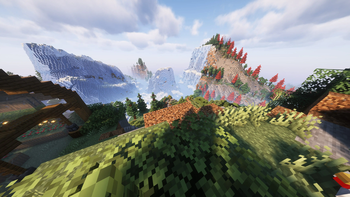
Create: Boundless Crafts screenshots
About this modpack
Create: Boundless Crafts
This modpack features various QoL-modifications and is focused heavily on the create mod. It may be a bit perormance-hungry, so feel free to remove (or add) mods.
Important note
Terralith doesn't generate a lot of andesite, so to use it properly with Create you will need to download this Datapack and use it in your worlds:
Terralith - Create Compat Datapack (CurseForge)
Versions
Here are some important versions:
*Minecraft: 1.19.2 Create: 0.5.1-c Sodium: 0.4.4 Fabric:* 0.14.23
Details
Mod list
The mods used in this modpack are listed here.
Main Content
These are the mods providing the main content of this modpack.
- ComputerCraft: Restitched
- Create
- Farmer's Delight
- Traveler's Backpack
- Small Ships
- Supplementaries
Quality of Life Features
Here are mods, that make the entire experience more satisfying.
- 3D Skin Layers
- Advanced Tooltips
- Advancement Plaques
- AppleSkin
- Better Animations Collection
- Better Mount HUD
- Better Stats
- Blur
- Boosted Brightness
- Borderless Mining
- Bushier Flowers
- Charmonium
- Chipped
- CIT Resewn
- Continuity
- Craftify
- Dark Loading Screen
- Deeper and Darker
- Detail Armor Bar
- Drip Sounds
- Easy Anvils
- Eating Animation
- Extended Drawers
- FabriShot
- Falling Leaves
- FancyMenu
- Fast Quit
- Glowing Tools
- Jade
- Lambda Better Grass
- Lambda Dynamic Lights
- Lanterns Belong on Walls
- Legendary Tooltips
- Make Bubbles Pop
- MCG (Minecraft Coordinates GPS)
- Mod Menu
- Mouse Tweaks
- Mouse Wheelie
- No Telemetry
- Not Enough Animations
- Patchouli
- Presence Footsteps
- Rechiseled
- Right-Click Harvest
- Roughly Enough Items
- Screenshot to Clipboard
- Screenshot Viewer
- Smooth Scrolling Everywhere
- Smooth Swapping
- Sound Physics: Remastered
- Spawn Animations
- Visuality
- Visual Workbench
- Wavey Capes
- WorldEdit
- Zoomify
Addon Features
These are the addon mods, to enhance the main mods with new features.
- Create Chunkloading
- Create Deco
- Create Goggles
- Create Utilities
- Create Enchantment Industry
- Create Jetpack
- Create Sandpaper Overhaul
- ComputerCraft: Create Bridge
- Expanded Delight
- Extended Gears
- Jade Addons
- Rechiseled Create
- Roughly Enough Loot Tables
- Create Slice and Dice
- Create Steam and Rails
- ComputerCraft: Tom's Peripherals
- WorldEdit Items
World Generation Enhancements
Those mods make the world look amazing.
- Additional Structures
- ChoiceTheorem's Overhauled Village
- Immersive Structures
- Oh The Biomes You'll Go
- Tectonic
- Terrablender
- Terralith
Performance Mods
(Self explanatory)
- Clumps
- Concurrent Chunk Management Engine
- Dynamic FPS
- Entity Culling
- FastBack
- Immediately Fast
- Indium
- Iris
- Language Reload
- Lazy DFU
- Lithium
- More Culling
- Phosphor
- Reese's Sodium Options
- Sodium Extra
- Sodium
Fixes
These mods fix some incompabilities or bugs.
- Anti-Ghost
- Create Fabric REI Bug Fix
- CTov Farmers Delight Compat
- Model Fix
- Memory Leak Fix
- Sodium Shadowy Path Blocks
- Tooltip Fix
Libraries
These mods are required by the content mods.
- Architectury
- BadPackets
- Cloth Config
- Enhanced Block Entities
- Fabric API
- Fabric Language Kotlin
- Ferrite Core
- Fusion
- GeckoLib
- Global Packs
- Iceberg
- JamLib
- Konkrete
- Moonlight
- Prism
- Puzzle
- Puzzles Lib
- Resourceful Lib
- Supermartijn642 Config Lib
- Supermartijn642 Core Lib
- Yet Another Config Lib
Good luck on your journey!
Modpack wiki coverage
Orca uses the project's published metadata and version files as the source of truth. Item, block, mob, recipe, structure, dimension, GUI, and mechanic pages are added after their included mod files are extracted and attributed.