- Downloads
- 44K
- Mod loaders
- fabric, quilt
- Minecraft versions
- 26.2, 26.1.2, 26.1, 1.21.11, 1.21.10, 1.21.9, 1.21.8, 1.21.7, 1.21.6, 1.21.5, 1.21.4, 1.21.3
- Categories
- lightweight, multiplayer, optimization
Enhanced FPS screenshots
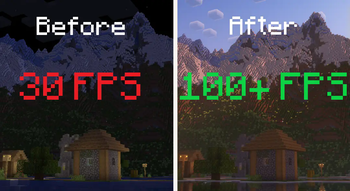

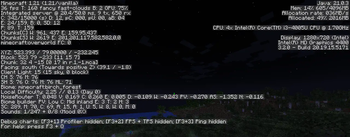
About this modpack
Performance First
The Enhanced FPS modpack is all about making Minecraft run as smoothly as possible. It boosts performance, shortens loading times, and helps your game feel faster. With the help of this modpack you should be able to improve your performance to the maximum.
🚀 Features
- ⚡ Better FPS and smoother gameplay
- ⏱️ Faster startup and world loading
- 🎨 Shader support and premade settings
- 🪟 Borderless fullscreen and other small improvements
- 🎮 Fully client-side and multiplayer compatible
🔗 Other Packs in the Enhanced Series
- [Technically Enhanced](https://modrinth.com/modpack/technically-enhanced)
Vanilla-friendly with technical mods like Litematica, Carpet, and Tweakeroo.
- [Enhanced Quality](https://modrinth.com/modpack/enhanced-quality)
Improves visuals, audio, and adds quality-of-life features.
- [Enhanced FPS NeoForge](https://modrinth.com/modpack/enhanced-fps-forge)
NeoForge version of this pack.
📦 List of Mods
<details> <summary>Mods (27)</summary>
- **AsyncParticles
- [BadOptimizations](https://modrinth.com/mod/badoptimizations)
- [BetterBlockEntities](https://modrinth.com/mod/better-block-entities)
- [C2me](https://modrinth.com/mod/c2me-fabric)
- [ClothConfig](https://modrinth.com/mod/cloth-config)
- [CubesWithoutBorders](https://modrinth.com/mod/cubes-without-borders)
- [Debugify](https://modrinth.com/mod/debugify)
- [DynamicFPS](https://modrinth.com/mod/dynamic-fps)
- [EntityCulling](https://modrinth.com/mod/entityculling)
- [FabricAPI](https://modrinth.com/mod/fabric-api)
- [FastNoise](https://modrinth.com/mod/zfastnoise/versions)
- [FastQuit](https://modrinth.com/mod/fastquit)
- [FerriteCore](https://modrinth.com/mod/ferrite-core)
- [ForgeConfigAPI](https://modrinth.com/mod/forge-config-api-port/versions)
- [Immediatelyfast](https://modrinth.com/mod/immediatelyfast)
- [Iris](https://modrinth.com/mod/iris)
- [Kotlin](https://modrinth.com/mod/fabric-language-kotlin)
- [Krypton](https://modrinth.com/mod/krypton)
- [LanguageReload](https://modrinth.com/mod/language-reload)
- [Lithium](https://modrinth.com/mod/lithium)
- [Modernfix](https://modrinth.com/mod/modernfix-mvus)
- [ModMenu](https://modrinth.com/mod/modmenu)
- [MoreCulling](https://modrinth.com/mod/moreculling)
- [NoChatReport](https://modrinth.com/mod/no-chat-reports)
- [ReesesSodiumOptions](https://modrinth.com/mod/reeses-sodium-options)
- [RemoveReloadingScreen](https://modrinth.com/mod/rrls)
- [Sodium](https://modrinth.com/mod/sodium)
- [SodiumExtra](https://modrinth.com/mod/sodium-extra)
</details>
---
❓ Need Help?
Join the [Discord server](https://discord.com/invite/H7WWUz9wvN) for support, suggestions, or feedback.
Modpack wiki coverage
Orca uses the project's published metadata and version files as the source of truth. Item, block, mob, recipe, structure, dimension, GUI, and mechanic pages are added after their included mod files are extracted and attributed.