- Downloads
- 30.8K
- Mod loaders
- fabric
- Minecraft versions
- 1.20.4, 1.20.2, 1.20.1
- Categories
- combat, lightweight, optimization
LabyModpack screenshots
About this modpack
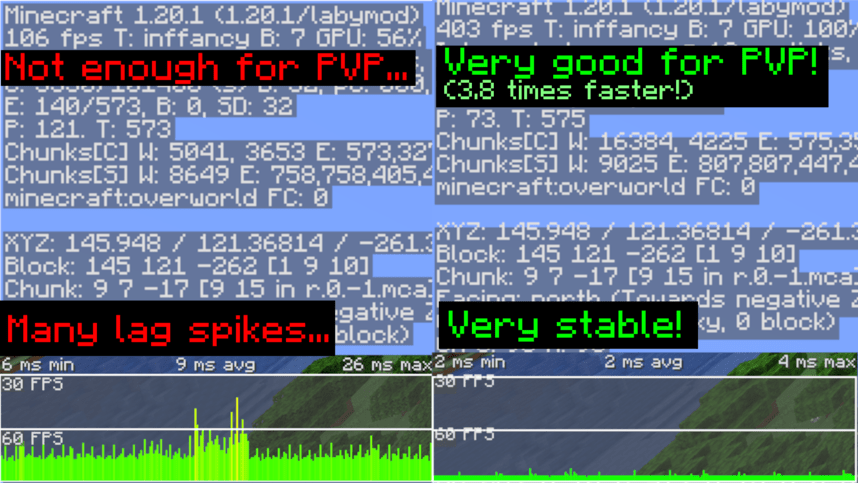
If you having issues with the modpack, please let me know: Bug Report !FPS Difference
LabyModpack
A modpack specially designed to run LabyMod 4 Client smootly without having multiple issues & crashes.
📥 Installation
To install LabyModpack, You will need to use LabyMod Launcher.
- Press "CTRL + Shift + M" in LabyMod Launcher.
- Click on "Fabric Mods" next to "LabyMod Addons"
- Click on filter button.
- Uncheck "Show Installed" and "Only Show Recommended"
- Check "Show Modpacks"
- Search "LabyModpack"
- Install LabyModpack
📈 Test Results
Tested on Ryzen 7 5800X, RTX 3060 and 32GB RAM.
32 Chunks Singleplayer Superflat world
Tested with Minecraft Performance Flags Benchmark
- Outdated. will update it.
| | LabyMod Vanila | With LabyModpack | |:---------------------------------------------:|:---------------------:|:------------------------:| | Average FPS (Higher is better) | 817.94 FPS | 1518.73 FPS | | Average 1% Frametime (Lower is better) | 2.96ms | 1.55ms | | Avg FPS Variance (Lower is better) | 2563.06 | 201.41 |
❓ FAQ
Q: I can't see texts on signs when I'm far away from sign!
A: This is because of FeyTweaks mod's default settings. Go to options menu, click on icon next to Online option, click on FeyTweaks and disable "Hide text in distance"
Modpack wiki coverage
Orca uses the project's published metadata and version files as the source of truth. Item, block, mob, recipe, structure, dimension, GUI, and mechanic pages are added after their included mod files are extracted and attributed.