- Downloads
- 1.4K
- Mod loaders
- fabric
- Minecraft versions
- 1.21.1
- Categories
- adventure, combat, lightweight
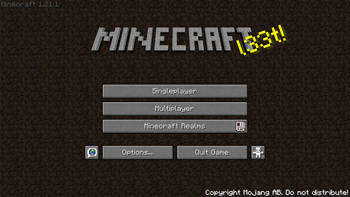
Nostalgia screenshots


About this modpack
A journey back to the roots of Minecraft. Experience the game as it was in its early days, with classic textures, familiar mechanics, and that timeless charm. Rediscover the simple, adventurous spirit that made the game unforgettable, while enjoying the benefits of modern versions and features.
---- What to expect:
- Original textures and sounds
- Classic world generation
- Classic villages, with workstations & beds
- Modern stability and performance
- The same fun and excitement you had when you first played
<br>
Q&A:
- Q: How do I get the classic world generation?
A: Simply use <u>Moderner Beta</u> when creating your world.
- Q: How can I enable the fog effect?
A: Press <u>F6</u> to enable fog whenever you want.
<br> <br>
Feel free to suggest changes/additions via the Github issues tab.\ Also on [Curseforge](https://www.curseforge.com/minecraft/modpacks/nostalgia-cf), if thats your type of thing...
Modpack wiki coverage
Orca uses the project's published metadata and version files as the source of truth. Item, block, mob, recipe, structure, dimension, GUI, and mechanic pages are added after their included mod files are extracted and attributed.