- Downloads
- 1.9K
- Mod loaders
- fabric, quilt
- Minecraft versions
- 1.20.1
- Categories
- lightweight, multiplayer, optimization
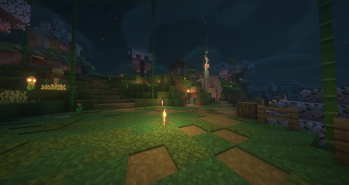
OptiBlend screenshots
About this modpack
OptiBlend: The Ultimate Minecraft Optimization Modpack
OptiBlend brings together the best features from the famous "Fabulously Optimized" and "Simply Optimized" modpacks. This modpack is carefully designed to offer an easy installation process and unmatched performance, combining optimization and convenience.
Embark on a unique Minecraft adventure where crucial performance mods, network stack improvements, and thoughtfully chosen quality-of-life additions seamlessly come together.
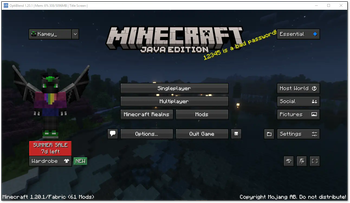
UI: Title Screen !UI Picture of the game window, start screen
Why Choose OptiBlend?
OptiBlend reflects my personal preference when it comes to Minecraft modpacks. I discovered that while the "Simply Optimized" modpack focused solely on optimization, it lacked the essential quality-of-life mods that I consider important. On the other hand, the "Fabulously Optimized" modpack included numerous quality-of-life mods, but some of them felt unnecessary or excessive to me.
<details>
<summary><strong>Included mods:</strong>
</summary>
- advancementinfo-1.20-fabric0.83.0-1.4.jar
- antighost-1.20-fabric0.83.0-1.1.5.jar
- appleskin-fabric-mc1.20-2.5.0.jar
- Barista-1.20-1.1.2-Fabric.jar
- BetterF3-7.0.0-Fabric-1.20-pre6.jar
- bettermounthud-1.2.2.jar
- bobby-5.0.0.jar
- c2me-fabric-mc1.20.1-0.2.0+alpha.10.91.jar
- capes-1.5.2+1.20-fabric.jar
- CITResewn-1.1.3+1.20.jar
- cloth-config-11.0.99-fabric.jar
- collective-1.20.1-6.62.jar
- craftableenchantedgolden_apple-1.0.6.jar
- Debugify-1.20.1+1.1.jar
- dynamic-fps-2.4.0.jar
- enhancedblockentities-0.9+1.20.jar
- entityculling-fabric-1.6.2-mc1.20.jar
- Essential-fabric_1-19.jar
- fabric-api-0.85.0+1.20.1.jar
- fabric-language-kotlin-1.9.6+kotlin.1.8.22.jar
- fastquit-3.0.0-beta.2+1.20+.jar
- ferritecore-6.0.0-fabric.jar
- guicompass-1.20.1-4.2.jar
- ImmediatelyFast-1.1.15+1.20.1.jar
- indium-1.0.18+mc1.20.jar
- iris-mc1.20-1.6.4.jar
- krypton-0.2.3.jar
- lambdynamiclights-2.3.1+1.20.1.jar
- language-reload-1.5.8+1.20.1.jar
- lazydfu-0.1.3.jar
- lithium-fabric-mc1.20.1-0.11.2.jar
- memoryleakfix-fabric-1.17+-1.1.1.jar
- modmenu-7.1.0.jar
- morechathistory-1.19.1-1.1.1.jar
- moreculling-1.20-0.18.1.jar
- NoChatReports-FABRIC-1.20.1-v2.2.2.jar
- peek-1.20.1-1.0.5.jar
- PresenceFootsteps-1.9.0.jar
- reesessodiumoptions-1.5.1+mc1.20-build.74.jar
- sodium-extra-0.4.20+mc1.20-build.103.jar
- sodium-fabric-mc1.20-0.4.10+build.27.jar
- starlight-1.1.2+fabric.dbc156f.jar
- tooltipfix-1.1.1-1.20.jar
- vmp-fabric-mc1.20.1-0.2.0+beta.7.96-all.jar
- yet-another-config-lib-fabric-3.0.3+1.20.jar
- Zoomify-2.10.0.jar
- Controlify-1.4.4+1.20.jar
</details>
Modpack wiki coverage
Orca uses the project's published metadata and version files as the source of truth. Item, block, mob, recipe, structure, dimension, GUI, and mechanic pages are added after their included mod files are extracted and attributed.