- Downloads
- 2.7K
- Mod loaders
- fabric
- Minecraft versions
- 1.21.5, 1.21.4, 1.21.1
- Categories
- kitchen-sink, multiplayer, optimization
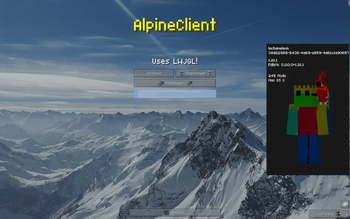
Peaks Client screenshots
About this modpack
!Made for Modrinth !Made for Modrinth <br> <br> <br> Peaks is a kitchen sink client, primarily featuring many new and fresh HUDs that optimize as well as improve your experience.
It also comes with the popular mods pre-baked, such as Sodium (improves FPS by 50%), Capes+ (OptiFine Capes & More) and the various RAY's 3d mods.
That being said, this dosen't alter the vanilla experience much.
It also adds some little known peformance mods, such as FastChest.
It also adds a FPS and ping HUD in the top left corner, as well as a map.
Yes, we have the mod menu.
Alpine Client has rebranded to Peaks client.
<iframe width="560" height="315" src="https://www.youtube-nocookie.com/embed/hfvhj5v2eLo" title="YouTube video player" frameborder="0" allow="accelerometer; autoplay; clipboard-write; encrypted-media; gyroscope; picture-in-picture; web-share" allowfullscreen></iframe>
<details> <summary>Title Screen</summary>
</details>
<details> <summary>Loading Screen</summary>
There's plenty more goodies for you to discover!
</details>
Special Thanks to AlphaLeoli for letting me put his customizable totem mod in the modpack
and moehrag for the Insomnia Mod
Credits in Mod Dependencies
<p xmlns:cc="http://creativecommons.org/ns#" >This work is licensed under <a href="https://creativecommons.org/licenses/by-nc-sa/4.0/?ref=chooser-v1" target="_blank" rel="license noopener noreferrer" style="display:inline-block;">Creative Commons Attribution-NonCommercial-ShareAlike 4.0 International <br> <br> <img style="height:22px!important;margin-left:3px;vertical-align:text-bottom;" src="https://mirrors.creativecommons.org/presskit/icons/cc.svg?ref=chooser-v1" alt=""><img style="height:22px!important;margin-left:3px;vertical-align:text-bottom;" src="https://mirrors.creativecommons.org/presskit/icons/by.svg?ref=chooser-v1" alt=""><img style="height:22px!important;margin-left:3px;vertical-align:text-bottom;" src="https://mirrors.creativecommons.org/presskit/icons/nc.svg?ref=chooser-v1" alt=""><img style="height:22px!important;margin-left:3px;vertical-align:text-bottom;" src="https://mirrors.creativecommons.org/presskit/icons/sa.svg?ref=chooser-v1" alt=""></a></p>
Modpack wiki coverage
Orca uses the project's published metadata and version files as the source of truth. Item, block, mob, recipe, structure, dimension, GUI, and mechanic pages are added after their included mod files are extracted and attributed.