- Downloads
- 1.1K
- Mod loaders
- fabric
- Minecraft versions
- 1.21.11, 1.21.10, 1.21.4, 1.21.3
- Categories
- adventure, kitchen-sink, optimization
Pinky screenshots
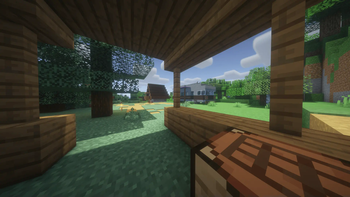

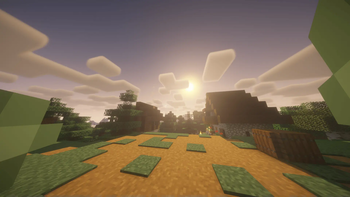
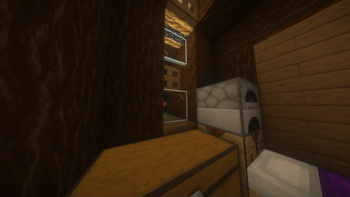
About this modpack
Pinky
Pinky is an extensive Minecraft modpack crafted to significantly enhance the gameplay experience and make it much more engaging. It features a large collection of mods focused on performance optimization, graphical improvements, quality-of-life features, and introducing exciting new gameplay elements.
Good Survival is the ideal choice for players seeking a richer, more challenging, and visually stunning survival adventure in Minecraft.
What mods it have:
<details> <summary>List of mods</summary> From version: 1.0.4
- Architectury API
- Better Mount HUD
- Sodium Extra
- FancyMenu
- Silk
- Sound Physics Remastered
- Fancy Beds
- Shulker Box Tooltip
- FallingTree
- Fresh Animations
- Optimum Realism
- Mod Menu
- Xaero's Minimap
- Voice Chat Interaction
- FerriteCore
- Sodium
- Lithium
- SuperMartijn642's Core Lib
- Faithful 64x
- Cloth Config API
- ukulib
- Fast IP Ping
- Searchables
- Fabric API
- oωo (owo-lib)
- Mouse Tweaks
- Chat Heads
- Pufferfish's Attributes
- BetterF3
- Distant Horizons
- Language Reload
- Yeahlows PVP Pack
- Traveler's Backpack
- Concurrent Chunk Management Engine (Fabric)
- Melody
- Veinminer
- Debugify
- Dramatic Skys
- Presence Footsteps
- Cardinal Components API
- uku's Armor HUD
- CraterLib
- BSL Shaders - Classic
- [ETF] Entity Texture Features
- Low On Fire
- Essential Mod
- Fast Better Grass
- Cherished Worlds
- Fabric Language Kotlin
- Pink Dreams
- ImmediatelyFast
- Better Than Mending
- No Pumpkin Blur
- - TerraBlender
- AmbientSounds
- Dynamic FPS
- spark
- Iris Shaders
- Simple Voice Chat
- Jade 🔍
- Simple Discord RPC
- Visuality
- Remove Reloading Screen
- Status Effect Bars
- Zoomify
- Background - Photorealistic Forest
- Drip Sounds
- CreativeCore
- [EMF] Entity Model Features
- Capes
- Konkrete
- Just Enough Items (JEI)
- Complementary Shaders - Unbound
- Entity Culling
- Falling Leaves
- LambDynamicLights - Dynamic Lights
- YetAnotherConfigLib (YACL)
- Sit
- Controlling
- No Chat Reports
- Forge Config API Port
- Continuity
- Text Placeholder API
- Xaero's World Map
- Not Enough Animations
- Connected Glass
- Reese's Sodium Options
- Wavey Capes
- Fusion (Connected Textures)
- Dark Smooth GUI
- Crash Assistant
- Even Better Enchants
</details>
I have low fps and few warnings help!
<details> <summary>Errors/Warning > Fixs</summary>
- Gargabe collector error!
A. Click settings > Java and memory > Enable custom java arguments > Paste this: -XX:+UseZGC -XX:+ZGenerational B. Change ram to 10GB, 12GB (16 GB Is litte bit too much)
- Chunky error that DH can render faster!
A. Ignore it OR A2. Remove chunky and use DH chunky alternative
- Game loaded but in menu in laggy!
A. For some reason in main menu game will load infinite time until you click any option (Indicated by loading bar) </details>
From where are the mods?
They are all from modrinth so don't worry there's no virus or anything like that
Did my computer will explode with that amout of mods?
Mods was test'ed on my laptop that have
- GPU: GTX 1650
- CPU: AMD Ryzen 5 4600H
- RAM: 8GB
- And it works (With BSL Classic sharders)
Tested on pc too!
- GPU: RTX 5070 TI
- CPU: Intel Core i5-14400F
- RAM: 32GB
- 60 FPS (Vsync) very smooth gameplay
It have any TXT?
Yeah it have:
<details> <summary>TXT's</summary>
- Faithful 64x
- Optimum Realism
- Fancy Beds
- Pink Dreams
- Low On Fire
- Fast Better Grass
- Even Better Enchants
- Cherry Background
- Dark Smooth GUI
- Dramatic Skys
- No Pumpkin Blur
- Yeahlow's PVP Pack
</details>
It have any shaders?
<details> <summary>List of shaders</summary>
- Complementary Shaders - Unbound
- BSL Shaders - Classic
</details>
Telegram soon
Modpack wiki coverage
Orca uses the project's published metadata and version files as the source of truth. Item, block, mob, recipe, structure, dimension, GUI, and mechanic pages are added after their included mod files are extracted and attributed.