- Downloads
- 1.6M
- Mod loaders
- fabric
- Minecraft versions
- 26.2, 26.1.2, 26.1.1, 26.1, 1.21.11, 1.21.10, 1.21.9, 1.21.8, 1.21.7, 1.21.6, 1.21.5, 1.21.4
- Categories
- lightweight, multiplayer, optimization
OptiFabric screenshots
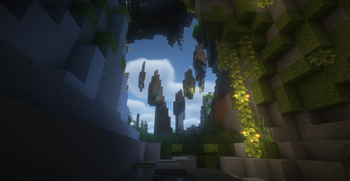
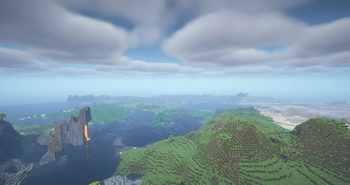
About this modpack
<p> <img src="https://www.bisecthosting.com/images/CF/OptiFABRIC/BHOFheader.webp" alt="OptiFabric Banner"> </p>
<p align="center"> <a href="https://discord.gg/a2fhAY8wnQ" target="blank" rel="nofollow noopener"> <img src="https://img.shields.io/discord/897508851979526164?color=blue&label=Discord&logo=Discord&style=for-the-badge" alt="Discord"> </a> <a href="https://www.curseforge.com/members/creanter/projects" target="blank" rel="nofollow noopener"> <img src="https://img.shields.io/badge/My-projects-orange?style=for-the-badge&logo=curseforge" alt="My projects"> </a> </p>
<hr>
<h2 align="center">✨ OptiFabric</h2>
<p align="center"> <strong>OptiFabric</strong> is a modern Fabric replacement for OptiFine, bringing OptiFine-like features, shader support, resource pack compatibility, and better optimization for higher FPS and smoother gameplay. </p>
<hr>
<h2>🚀 Main Benefits</h2>
<table> <tbody> <tr> <td>⚡ Higher FPS</td> <td>Improves overall game performance and responsiveness.</td> </tr> <tr> <td>💾 Lower RAM Usage</td> <td>Reduces memory usage and unnecessary system load.</td> </tr> <tr> <td>🌅 Shader Support</td> <td>Allows using shaders on Fabric.</td> </tr> <tr> <td>🧱 Rendering Optimization</td> <td>Optimizes blocks, entities, chunks, and visual effects.</td> </tr> <tr> <td>👀 Smart Culling</td> <td>Stops rendering blocks and entities that are not visible to the player.</td> </tr> <tr> <td>🌐 Server Ping Optimization</td> <td>Improves multiplayer server list pinging and makes refreshing servers faster and smoother.</td> </tr> <tr> <td>🛡️ Background Optimization</td> <td>Lowers resource usage when Minecraft is minimized.</td> </tr> </tbody> </table>
<hr>
<h2>❓ What Does It Replace From OptiFine?</h2>
<table> <tbody> <tr> <td>🔍 Zoom</td> <td>✅ Included</td> </tr> <tr> <td>🌅 Shaders</td> <td>✅ Included</td> </tr> <tr> <td>💡 Dynamic Lights</td> <td>✅ Included</td> </tr> <tr> <td>🍃 Smart Leaves</td> <td>✅ Included</td> </tr> <tr> <td>🦸 Capes</td> <td>✅ Included</td> </tr> <tr> <td>⚙️ Advanced Video Settings</td> <td>✅ Included</td> </tr> <tr> <td>📸 HD Screenshots</td> <td>✅ Included</td> </tr> </tbody> </table>
<hr>
<h2>🎨 Resource Pack Features</h2>
<table> <tbody> <tr> <td>🖼️ Animated Textures</td> <td>🔗 Connected Textures</td> </tr> <tr> <td>🔳 Custom GUI</td> <td>🪙 Custom Items</td> </tr> <tr> <td>☁️ Custom Sky</td> <td>🅰️ HD Fonts</td> </tr> <tr> <td>🎲 Random Entities</td> <td>📐 Custom Entity Models</td> </tr> <tr> <td>🌈 Custom Colors</td> <td>🚀 Splash Screen Support</td> </tr> <tr> <td>🔍 Anisotropic Filtering</td> <td>📷 HD Screenshots</td> </tr> </tbody> </table>
<hr>
<h2>💬 Community & Support</h2>
<p> Need help, want to report a bug, or follow updates? Join the Discord community. </p>
<p align="center"> <a href="https://discord.gg/a2fhAY8wnQ" target="_blank" rel="nofollow noopener"> <img src="https://img.shields.io/badge/Join-Discord-blue?style=for-the-badge&logo=discord" alt="Join Discord"> </a> </p>
<hr>
<p align="center"> <a href="https://billing.sparkedhost.com/aff.php?aff=2774" target="_blank" rel="nofollow noopener"> <img src="https://imgur.com/71IXfzh.png" alt="Hosting"> </a> </p>
Modpack wiki coverage
Orca uses the project's published metadata and version files as the source of truth. Item, block, mob, recipe, structure, dimension, GUI, and mechanic pages are added after their included mod files are extracted and attributed.